A full disk can break more than the program writing to it. In an early bounded Linux test, smolvm could stop a machine but could not finish deleting it: VM data and the worker's database shared a filesystem, and that filesystem was full.
That failure gave us a concrete requirement. Workload storage could run out, but the worker still needed room to manage cleanup. We later tested a corrected layout in a disposable Linux lab, alongside memory exhaustion, worker failure, and recovery when the entire outer VM stopped responding.
This article follows those experiments. The question was simple: after the workload or its worker fails, can we account for the execution, remove its resources, and run the next one?
What we wanted to learn
SmolBox is an Elixir client and supervised execution runtime for smolvm workers. smolvm supplies the microVM isolation. SmolBox tracks execution identity, results, collected files and cleanup. The introductory article explains that integration with a Python example.
An Elixir supervisor can restart its children. Recovering external work also requires evidence about the machine and command those children were managing. If a worker accepted a command before disappearing, restarting the controller does not tell us whether that command ran.
We wanted to observe three things together: enforcement of a deployment's resource limits, preservation of the execution record, and verified cleanup. A workload returning an error would establish only part of that story.
The initial nested lab established functional execution and independent VM recovery. A subsequent campaign added a bounded worker and PostgreSQL-backed controller. Both ran on Linux, following the SmolBox 0.1.0 release. The linked evidence records the source hashes for each stage; these measurements are not new benchmarks of the later 0.1.1 documentation release.
A disposable worker environment
The physical host ran QEMU with KVM acceleration. Inside its disposable Ubuntu guest, an Elixir controller communicated with smolvm 1.14.1 through a private Unix socket. smolvm created another Linux guest for each execution, using nested KVM. Approved images supplied Python and Node.js.

The outer guest had four virtual CPUs, 8 GiB of memory and a 100 GiB virtual disk. Its QEMU process had separate host controls: 12 GiB of charged memory, zero swap, four CPUs of bandwidth and 256 host tasks. A preallocated 128 GiB volume bounded lab images, copies and evidence.
Those separate budgets mattered. An advertised virtual disk size does not
account for every host file. We also caught a provisioning mistake: formatting
the backing volume discarded its storage reservation. Using nodiscard and
checking allocated blocks preserved the reservation after formatting.
Provisioning allowed downloads. Test mode restricted networking and kept SSH management on the physical host's loopback interface. We sealed a cold baseline, then created disposable overlays for test runs. A disk exposed to test workloads was never promoted back into the baseline.
We also verified real nested execution. Seeing nested=Y or /dev/kvm was only
a prerequisite: the probe inspected live KVM VM/vCPU descriptors, ran a program
through SmolBox, collected binary output and verified deletion. The
kernel documentation
warns about confusing software emulation with nested KVM.
A full disk still needs a working cleanup path
The earlier disk experiment filled a 512 MiB worker data mount. The guest received an I/O error after writing 336,592,896 bytes. Stop succeeded, but deletion could not commit because the worker's database had no space left. Explicit teardown of the owned environment was required.
In the later nested deployment, we separated two writable filesystems:
| Filesystem | Budget | Contents |
|---|---|---|
| VM/cache storage | 768 MiB | VM disks, extracted layers and VM logs |
| Control metadata | 64 MiB | Worker state needed to manage machines |
We filled the VM/cache mount again. Guest writes returned EIO after
591,396,864 acknowledged bytes, while the backing mount reached all
805,306,368 bytes of its capacity. The metadata filesystem still had free
space. Stop, delete and inspection confirming machine absence all succeeded.
The recorded disk probe contains these fields:
errno:   5            # EIO observed inside the guest
written: 591396864    # guest bytes acknowledged before failure
cleanup: verified_absent
This is an excerpt of recorded values, not a command to run. The guest's acknowledged writes and total backing-filesystem usage measure different things; the latter also includes existing worker files and storage overhead.
The correction was a deployment change. It preserved metadata capacity when VM storage filled; it did not alter smolvm's behavior on a shared filesystem. Because these mounts use tmpfs, their written pages also consume the worker's memory budget. Separate storage capacity does not remove that shared memory boundary.
Cleanup needs resources that the workload cannot consume completely. That lesson also applies to systems that need disk space to record failures, release leases or acknowledge completed work.
Memory exhaustion at two different layers
We first exhausted memory inside a 256 MiB microVM. The Python child exited with signal 9, and the guest kernel log recorded an OOM kill. That established guest behavior under memory pressure. We separately tested the worker's own limit.
The worker service and its VMM descendants shared a 1.5 GiB cgroup memory boundary with swap disabled. A test injector deliberately joined that cgroup and allocated memory. This exercised the host-process limit directly; we did not describe it as a guest program escaping its VM.
The host exhaustion record reported:
peak_bytes:        1610612736
oom_kill:          1
supervisor_result: oom-kill
The kernel recorded the denial and systemd stopped the worker. We verified removal of its owned processes and health after restoring the worker.
A separate durable recovery scenario exercised worker OOM while SmolBox managed an execution. After controller restart with its original store and keys, the record retained its identity and an unknown result. The dispatch ledger showed one dispatch; capacity stayed reserved during the outage and was released only after owned resources were verified absent.
That distinction matters for an Elixir application. Removing the VM answers the cleanup question. It does not reconstruct the command's result. We checked the same distinction when the database became unavailable and when an independent supervisor stopped the worker at its time limit. In these tests, SmolBox recovered without sending the command again. That does not guarantee that a command will always run exactly once.
Recovery when the outer VM stops responding
So far, the outer guest's kernel could still enforce the worker's limits. We also needed a recovery path when that whole environment became unresponsive.
We froze the outer QEMU process with SIGSTOP. Guest SSH and any recovery code
inside the guest could no longer make progress. A separate systemd unit on the
physical host enforced the probe's 30-second lifetime and 15-second stop grace.
The regular lab test unit has a 45-minute lifetime; the short probe exercised
the independent teardown mechanism.
The host terminated the frozen process. Its recovery timer then checked that the old processes and cgroup were gone, verified the baseline digest and created a fresh writable overlay. A replacement VM booted without the marker left in the previous guest. The timer prepared the replacement disk; it did not automatically start another test or replay the interrupted command.
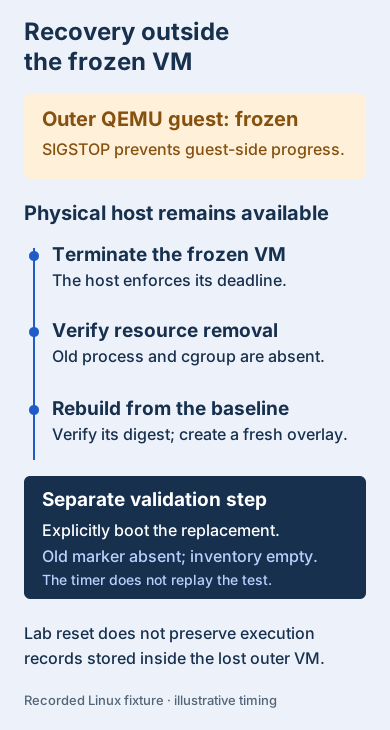
That sequence was recorded in the initial lab evidence. After the later campaign, replacement validation also checked all 38 qualification source hashes and performed another real KVM execution and deletion.
Recovery must remain available when the environment it needs to replace stops responding.
The controller and PostgreSQL in that campaign also lived inside the disposable outer VM. Restoring its baseline tested recovery of the lab environment; preserving execution records across the loss of that VM would require a separate storage and recovery design.
Recovery had its own failure during setup: the operator's existing systemd user manager had not picked up newly granted group membership, so it could not rebuild the disk. Explicit group activation corrected that. A timer being enabled was insufficient evidence; we needed to observe the replacement.
Evidence collection also had limits. The host retained bounded status and cgroup observations and a 1 MiB serial ring. Frozen QEMU could not supply a new serial capture, so previous successful captures remained useful. A failed physical-host kernel would still require operator recovery; we did not test a physical-host crash.
Read the limits at the layer that enforces them
The experiments exposed several distinctions worth keeping in an operational runbook. Linux's cgroup v2 documentation describes the underlying controllers; our deployment checked their effective values before admitting work.
| Setting or observation | Meaning in this deployment |
|---|---|
| One CPU of worker bandwidth | A rate shared by the worker and VMM processes, not a total CPU-time allowance |
| 1.5 GiB worker memory | Cgroup charged memory, including charged tmpfs pages, not per-process RSS |
| 96 host tasks | Processes and threads in the worker cgroup, not PIDs inside the microVM |
| 300-second worker lifetime | A service deadline enforced by the outer guest's kernel, not a timer starting at command dispatch |
The guest process probe created 192 children despite the 96-host-task limit. That was consistent with the separate guest kernel domain. Dedicated host injectors separately recorded task denial and CPU throttling.
We also weakened the deployment deliberately. Eleven startup cases, including a higher memory limit, missing storage mount and disabled private networking, were rejected before the API server started. Testing rejection checked that the declared configuration was actually part of admission.
Reusing the method
The lab guide covers provisioning and recovery. The qualification guide describes the subsequent worker setup, experiments and limitations. The lab scripts are available for inspection, but they deliberately target this particular disposable environment and depend on prepared artifacts and a pinned baseline.
For another system, start with one failure and define the evidence required afterward. Record the execution identity, effective resource settings and relevant kernel counters. Then observe cleanup and a subsequent execution. Keep the controller's records outside workload storage, preserve failed attempts, and ensure recovery can act when the tested component cannot.
The campaign used one execution at a time, approved images, restricted networking, no host mounts and no production secrets. It did not assess arbitrary images, concurrent tenants or macOS resource enforcement. A guest symlink remained able to reference files outside the workspace within the guest; lexical path checks did not establish workspace containment. No hypervisor escape fuzzing or independent security review was performed. These observations cover the pinned nested Linux configuration. A different kernel, runtime or deployment needs its own validation.
Those boundaries belong beside the results. smolvm provides VM isolation, the deployment enforces host policy, and SmolBox tracks execution and recovery. The tested controls did not become portable hard-limit options in the library.
The useful outcome was a recovery procedure we had watched work under specific failures: preserve what was known, retain uncertainty where necessary, verify resource removal, and demonstrate that the next execution could proceed.