Suppose your Elixir application runs jobs that process files using Python and native tools. You want a prepared Linux environment for each job, with its dependencies and temporary files kept in a disposable VM. A user submits work and closes the browser. Your application still needs to collect the output and remove the VM. If the worker stops responding, it also needs to distinguish a failed command from a result it could not observe.
SmolBox is an Elixir client and supervised execution runtime for self-hosted smolvm workers. It manages work independently of the process that submitted it, tracking execution identity, observed outcome, collected files, and cleanup status.
This article uses Python as an example. SmolBox can also run JavaScript, TypeScript, or other programs when the approved guest image contains the required runtime and dependencies. TypeScript must be compiled beforehand or executed with a runner included in the image. The same execution lifecycle applies to each language.
Where SmolBox fits
Smol Machines develops smolvm, the open-source engine that runs the machines. It uses libkrun as its virtual machine monitor to run Linux guests through native host virtualization. smolvm also provides tools for preparing reusable environments.
Each managed SmolBox execution runs in its own Linux VM, giving the program a separate guest kernel and working environment for its dependencies and temporary files. This isolation is a reason to choose smolvm workers when an embedded interpreter or local process does not meet your requirements. smolvm provides the VM boundary; SmolBox coordinates execution and cleanup.
Firecracker was another option for the underlying VM runtime, but it requires Linux/KVM. We chose smolvm for native development on macOS Apple Silicon and execution on Linux workers, with an existing machine, command, and file API. That let us concentrate SmolBox on execution management in Elixir.
Prepared .smolmachine artifacts hold the guest environment; they must match the
worker's architecture. The
smolvm serve API
exposes machine, command, and file operations over HTTP, letting us keep the VM
engine in a separate worker process.
SmolBox 0.1.0 targets the self-hosted smolvm 1.14.1 worker API, tested on Linux x86_64/KVM and macOS Apple Silicon.
SmolBox coordinates that lifecycle under your application's supervision tree. The worker API already supplies the operations; SmolBox adds the execution record and the rules for submission, observation, file collection, and cleanup. Your application supplies the worker configuration, approved runtime images, execution identities, and store.

When another tool fits better
For a trusted Python library call, consider
Pythonx. It embeds Python in the same
OS process as Elixir and converts between their data structures. If that is all
you need, introducing a VM and worker service adds unnecessary work. An Erlang
Port or System.cmd/3 may also suffice for a trusted local helper.
OpenFaaS and
Knative Functions address deploying and
invoking functions as services. Consider them when you want a function platform
and its deployment, routing, and scaling facilities, especially if you already
operate one. OpenFaaS also offers faasd on a single VM, so avoiding Kubernetes
alone is not a reason to choose SmolBox.
Calling smolvm serve directly is reasonable for a small integration. SmolBox
becomes useful when you need the recorded lifecycle shown below and would
otherwise implement its failure handling yourself. That comes with operational
work: you prepare images, operate workers, and configure storage and capacity.
SmolBox does not build or publish those images or provide a hosted service.
Give the work a stable identity
The repository's minimal host
submits work like this. This excerpt assumes a started runtime and a validated
execution specification, spec; the complete example below
provides their setup.
submission = Task.async(fn -> SmolBox.submit(runtime, spec) end)
{:ok, handle} = Task.await(submission)
{:ok, ^handle} = SmolBox.submit(runtime, spec)
The submitting task exits; the supervised runtime and its store continue.
Task.await/1 here waits for submission, not for Python to finish. Acceptance
records intent; it does not mean the command has started or succeeded.
The handle is {scope, execution_id}. Reusing that identity with the same
specification returns the original handle. SmolBox checks a separate fingerprint
of the specification, including its command, approved artifact, profile, and
declared files. Changing the specification under the same identity produces an
:identity_conflict error.
Persist the execution ID with the request that authorizes the work. Generating a fresh ID for each retry can authorize another execution. The worker catalog remains trusted host configuration.
Execution, collection, and cleanup are separate
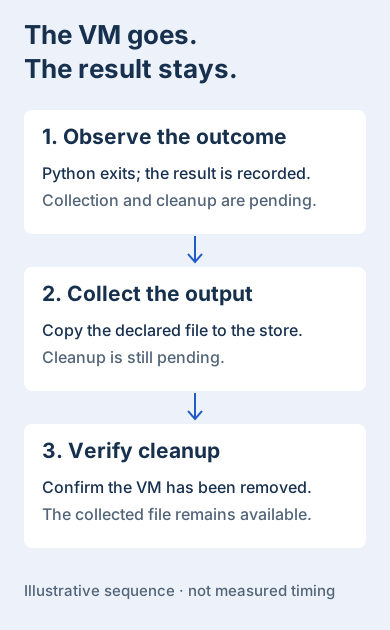
An execution can produce a result and still need file collection or cleanup. Read these fields separately:
| Field | What it tells you |
|---|---|
state | The execution's observed lifecycle state. |
result.exit_code | The program's exit status, when a result exists. |
collection | Whether the declared outputs were collected. |
cleanup | Whether machine cleanup has completed. |
reservation | Whether the runtime still holds a capacity reservation. |
SmolBox.await/3 returning {:ok, record} does not imply that Python exited
successfully. A nonzero exit is still an observed program result, and an unknown
outcome can have no result at all.
Cleanup can also remain pending after await/3 returns. Keep the runtime alive
and use SmolBox.fetch/3 to observe the original execution until cleanup and
capacity release are confirmed. The minimal host waits for both before stopping
its supervisor.
Read collected files through the configured artifact-store adapter; the VM may already have been deleted. See the result-handling guide for the concrete error and recovery cases.
A lost response is an unknown outcome
Suppose the worker accepts a command and the connection drops before Elixir receives its result. The command may already have run. Sending it again could repeat its effects.
SmolBox does not silently replay a command that may have been accepted. It records uncertainty and resumes observation where possible. The supported upstream API lacks the execution-fencing primitive needed to claim exactly-once execution across every failure.
A timeout from await/3 ends your wait; it does not cancel the command. Cancellation
is a separate request, and a confirmed terminated VM can still leave an unknown
command result. Cancellation, command outcome, and cleanup are different facts.
Caller independence does not establish restart recovery. The runtime requires
an explicitly configured SmolBox.Store adapter; its default mode requires
durability. The supplied in-memory store needs mode: :ephemeral and loses its
records when stopped. For restart recovery, use a durable adapter and retain the
fingerprint key. The
PostgreSQL host example
shows that integration.
Run the supplied Python example
The minimal host stages a Python program and binary input, submits the same execution twice, checks the output, and waits for the VM to be deleted. The program only reverses three bytes: a deliberately small lifecycle demonstration, not a workload that needs a VM. It makes submission, file collection, and cleanup easy to inspect.
Before running it, prepare a dedicated, empty smolvm 1.14.1 worker and a neutral-startup Python image using the runtime preparation guide. Run this example on that worker's host: Linux x86_64 with KVM, or macOS Apple Silicon. Use the worker's documented 1 MiB file-transfer cap.
The reference setup reserves 20 GiB of storage, a 10 GiB overlay, and 768 MiB of VMM overhead per execution. Check image templates and available host capacity; these are admission reservations, not certified hard quotas.
Clone the released example and use its pinned Elixir/OTP toolchain:
git clone --branch v0.1.0 --depth 1 https://github.com/hfiguera/smolbox.git
cd smolbox/examples/minimal_host
Create fresh private storage and a fingerprint key for this ephemeral demo:
export SMOLBOX_DEMO_ROOT="$(mktemp -d)"
chmod 700 "$SMOLBOX_DEMO_ROOT"
mkdir -m 700 "$SMOLBOX_DEMO_ROOT/objects"
export SMOLBOX_ARTIFACT_ROOT="$SMOLBOX_DEMO_ROOT/objects"
export SMOLBOX_FINGERPRINT_KEY_FILE="$SMOLBOX_DEMO_ROOT/fingerprint.key"

elixir -e 'path = System.fetch_env!("SMOLBOX_FINGERPRINT_KEY_FILE"); File.write!(path, :crypto.strong_rand_bytes(32), [:exclusive]); File.chmod!(path, 0o600)'
Set the worker URL and your prepared Python artifact's path and SHA-256. The example verifies the file against the approved digest before registering it.
export SMOLBOX_RUNTIME_URL=http://127.0.0.1:19470
export SMOLBOX_PYTHON_ARTIFACT=/absolute/path/to/python.smolmachine
export SMOLBOX_PYTHON_SHA256=replace_with_the_approved_64_character_sha256
export SMOLBOX_EXECUTION_ID=blog-python-001

MIX_ENV=test mix deps.get
MIX_ENV=test mix run scripts/demo.exs
The program reverses three bytes, from <<0, 255, 7>> to <<7, 255, 0>>. A
successful run prints a JSON record containing "state":"completed",
"exit_code":0, "collection":"complete", "cleanup":"complete", and
"reserved":false. Other fields identify the execution and collected artifacts.
The example also checks a one-byte marker written by the program. This does not establish an exactly-once execution receipt.
This host explicitly uses ephemeral storage and stops after the demonstration, losing its execution records. Keep the private directory until you finish examining its input and output objects. Do not attach another controller to the worker while it is active. After a failed demonstration, inspect the original execution and worker before attempting another run.
For a new application using the public Hex package, the
getting-started walkthrough
contains the full setup with {:smolbox, "~> 0.1.0"}. The repository example uses
a path dependency so its host code and library match the release tag.
Production qualification and remaining boundaries
Update — September 7, 2026: Since the 0.1.0 release, we have tested SmolBox in a constrained Linux deployment with externally enforced resource limits, including memory and storage exhaustion, CPU throttling, and recovery after worker failure. The qualification guide records the configuration, results, evidence, and remaining limitations.
SmolBox relies on smolvm's isolation model for running untrusted code. Production deployments must protect worker access and configure host resource limits, networking, and credentials.
Our validation results apply to the specific Linux deployment documented above. The example in this article uses a different setup and does not configure that deployment.
Guest CPU and memory allocations, admission accounting, and limits on collected output do not establish hard quotas on the worker host. Requests for unsupported controls remain rejected. Worker isolation, credentials, and upstream file-path boundaries require separate assessment for a deployment.
Read Deployment boundaries before deciding where to run it, including the supported controls and your application's responsibilities.
The useful abstraction is the execution record: a stable identity, an honest account of what happened, and cleanup that remains visible until it is finished.