A Python job needs fresh data. It downloads a public feed, summarizes the events, and writes a report for your Elixir application. The useful work fits in a few lines. Before it runs, there is another decision to make: what should that program be allowed to reach?
That decision belongs to the application operating the job. It should be reviewable before execution and still visible when someone investigates the result later.
SmolBox 0.1.3 adds explicit outbound network policies for disposable smolvm machines. Offline remains the default. An approved execution profile can now include hostnames or CIDR ranges, alongside the command's resource allocations and deadlines.
Let's give a small earthquake report an approved network policy, then follow its execution through collection and cleanup.
A report that needs one public feed
The USGS earthquake feeds provide public GeoJSON data. Our job reads the feed for magnitude 2.5 and greater earthquakes over the past day, counts the entries, and records the largest reported magnitude. It writes a JSON file for SmolBox to collect.
The program uses Python's standard library. It needs no API key, package install, or credentials forwarded from the host. Python is just the example; the same execution model applies to JavaScript, TypeScript or another program when the approved image contains its runtime and dependencies.
A feed this small could also be processed directly in Elixir. The example is useful because it makes the integration easy to inspect. The same structure fits a job that needs an existing Python data pipeline or native tools inside its own prepared environment.
This example uses SmolBox 0.1.3 and smolvm 1.16.0. If you are upgrading an existing application, read the upgrade guide first.
Put access in the approved profile
The application chooses the hostname before submitting the job:
{:ok, network} =
  SmolBox.NetworkPolicy.new(hosts: ["earthquake.usgs.gov"])

{:ok, profile} =
  SmolBox.Profile.new("earthquake-report-v1",
    network: network,
    storage_gb: 1,
    overlay_gb: 1,
    host_overhead_mb: 768,
    preparation_ms: 120_000,
    execution_ms: 30_000
  )
Those disk allocations require a worker and artifact verified for 1 GiB storage
and a 1 GiB overlay, including working resize2fs on the host. They are admission
values, not hard host resource quotas. Use the verified floors for your images.
Register that exact profile in the worker's approved catalog, then attach it to the execution specification. The guest program receives the access you approved; it does not choose its own policy. Give a changed policy a new profile ID so the change is explicit in configuration and execution history.
SmolBox checks the runtime version before sending a network-enabled create. It asks smolvm for the policy and requires the creation response to report matching allowlists and backend. That checks the API contract. The actual network restriction is enforced by smolvm and the deployment around it.

A hostname rule is not an HTTP rule
There is an important detail behind hosts: ["earthquake.usgs.gov"]:
smolvm learns allowed destination IPs from DNS replies. The hostname also permits
its subdomains. It does not restrict URL paths, destination ports or TLS server
names. Another service on an allowed IP may be reachable.
That matters when a job needs a specific API endpoint. A hostname policy does not express “GET requests to this path.” Use application authorization and other deployment controls when you need that level of restriction.
smolvm also permits access to infrastructure endpoints outside the allowlist, including its DNS gateway and an authenticated rollout endpoint. See the networking guide for these exceptions and their implications.
Fetch, collect, clean up
The snippets below come from the complete runnable example.
Start with a dedicated empty worker, an approved native Python image with a neutral
/bin/true startup, and a working certificate trust store. Follow the
getting-started guide for preparing the worker and artifact.
Keep its control endpoint private and its strict egress floor enabled.
The download is bounded to 1 MiB, with a ten-second HTTP timeout and a 25-second command deadline. The Python code verifies HTTPS certificates and rejects redirects, making an unexpected change of destination visible. These are choices in the example program, separate from the worker's network policy.
The report includes the feed's generation timestamp and a SHA-256 of the bytes downloaded. A changing public feed should not produce a report with no indication of which input it used.
Once the full example has configured its worker, staged its source and built
spec, the Elixir side looks like this:
{:ok, handle} = SmolBox.submit(SmolBoxDemo.Runtime, spec)

{:ok, record} =
  SmolBox.await(SmolBoxDemo.Runtime, handle, 180_000)

%{state: :completed, result: %{exit_code: 0}, collection: :complete} = record

{:ok, report} = Directory.read_output(objects, handle, "report", 4096)
Changing the network policy while reusing an execution identity causes a conflict. Network access is part of the authorization, even when the command itself stays the same.
The output comes from the artifact store. It remains available after the VM is
removed. await/3 can return before cleanup finishes, so the complete example
also waits for cleanup: :complete and the reservation to be released, then
checks that the dedicated worker is empty.
On September 14, 2026, I ran this example on macOS Apple Silicon using the published SmolBox 0.1.3 package and smolvm 1.16.0. It downloaded 25,798 bytes, counted 36 events, and reported a maximum magnitude of 5.6. Collection and cleanup completed, the reservation was released, and the worker was empty. The observed result records the feed timestamp, input hash, script hash and runtime identities. The feed changes, so your numbers will differ. This was an ordinary application example, separate from the enforcement tests below.
The example uses an in-memory store to keep setup small. An application needing recovery after a controller restart must supply a durable adapter. A lost response still means the outcome may be unknown; enabling networking does not authorize SmolBox to replay a potentially accepted command.
Proving a denied connection takes two observations
A failed request can mean the policy blocked it. It can also mean the destination was already unreachable.
Our Linux validation fixtures first confirmed that their permitted and denied responders were reachable from the worker's network namespace. Then they checked connections from guests with different policies. That positive control makes a denial meaningful. The fixtures also checked policy behavior after restart, followed by deletion and confirmation that owned VM resources were gone.
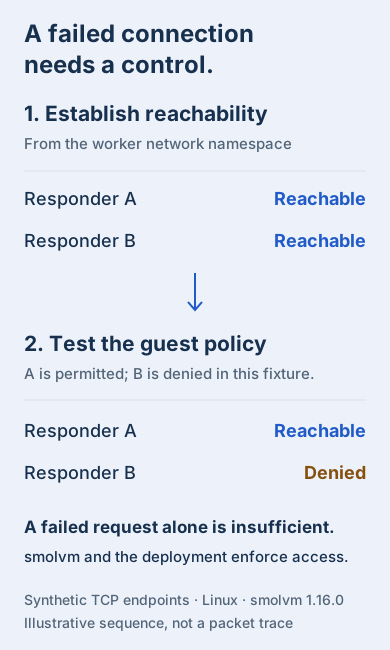
We tested allowed and denied connections in the disposable Linux lab, with additional IPv4 checks on macOS. The networking guide records the tested configurations and remaining gaps.
Keep the decision with the execution
The useful addition is that a job can reach an approved data source while the application still tracks its identity, outcome, collected files and cleanup. When the result needs investigating, its network policy is part of that record.
Start with the destinations the job needs, approve the profile, and test both reachability and denial in your deployment. Keep that access decision with the execution that used it.