Running Obscura on an NVIDIA GPU with Elixir, EXLA, and Lightning AI
Obscura's model-backed profiles had already been exercised on Apple Silicon. That proved the Elixir and Nx integration on macOS, but it said nothing about Linux, CUDA, or the precompiled EXLA runtime.
I did not have a spare Linux workstation with an NVIDIA GPU, so I used a Lightning AI Studio with a Tesla T4. The goal was deliberately narrow: start from a CPU environment, bring up the same Obscura example application on CUDA, and collect enough evidence to say that the BEAM was really executing model work on the GPU.
That last part matters. Installing :exla is not proof of GPU execution. Neither is seeing a
CUDA client in a list. A dependency is not a device.
Installed is not
the same as executing.
A GPU claim earns its way through five separate validation gates.
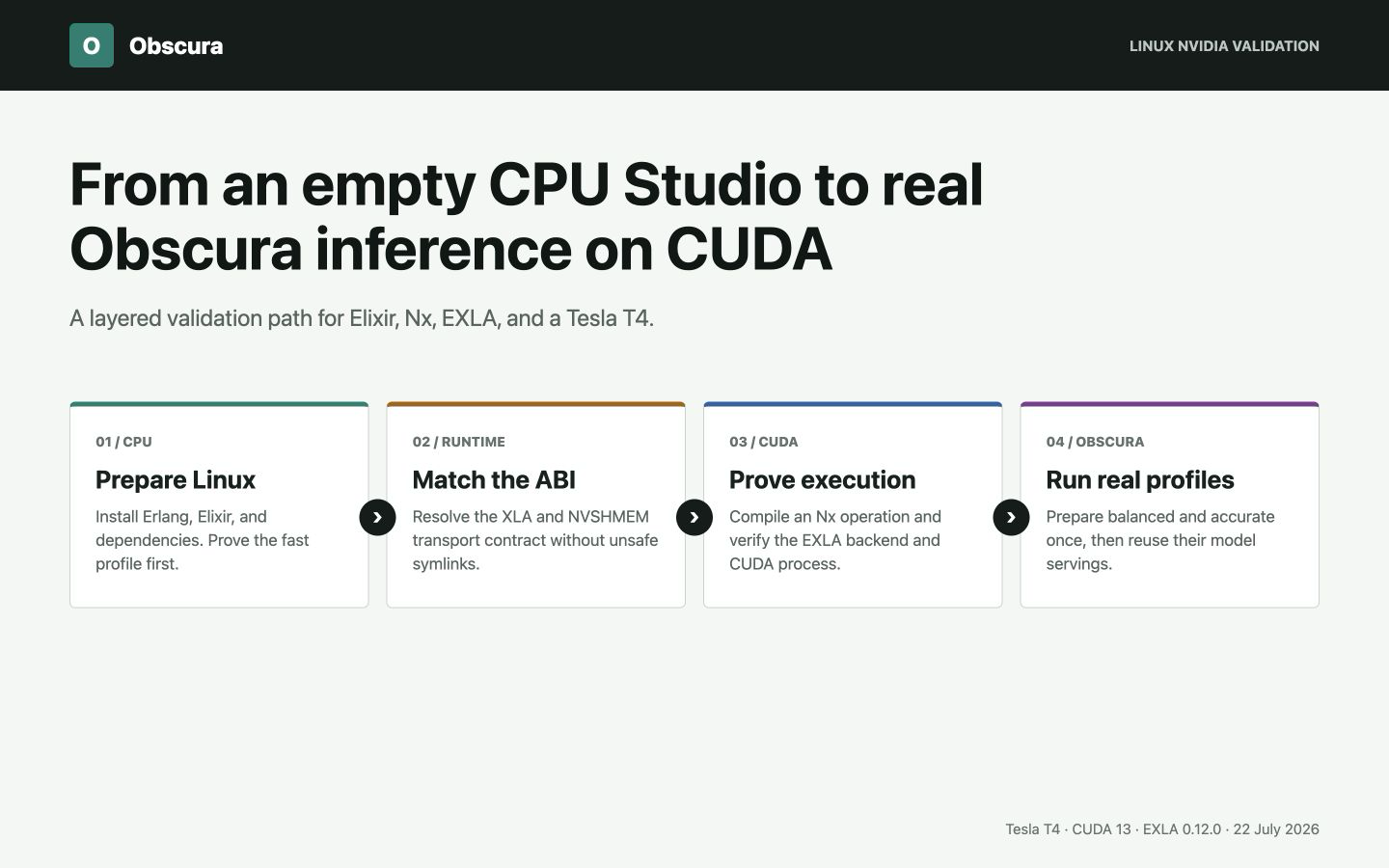
This article records the successful path, the NVSHMEM failure that blocked it, and the limits of the result. It is a compatibility report, not a claim that a T4 is the best production hardware for Obscura.
What I wanted to prove
The test had five separate gates:
- Phoenix and Obscura's
:fastprofile had to run on Linux before a GPU was involved. - EXLA had to discover a real CUDA device.
- A compiled Nx operation had to return an
EXLA.Backendtensor. - The
beam.smpprocess had to appear as a CUDA consumer. - Obscura's
:balancedand:accurateprofiles had to prepare, reuse their model servings, and return the expected detections.
This layering saved time. When the first EXLA attempt failed, I knew the application itself was already healthy.
Start on CPU
Lightning AI Studios are persistent cloud development environments with terminal, browser IDE, notebook, and SSH access. I selected a CPU machine first, installed the project toolchain, cloned Obscura Examples, and ran its preflight checks.
Starting on CPU is useful for two reasons. It avoids spending GPU time on package installation, and it gives you a clean baseline for failures that have nothing to do with CUDA. Lightning's own workflow documentation also recommends preparing code and dependencies before switching the Studio to a GPU.
The validated language versions were:
Erlang/OTP 29.0.3
Elixir 1.20.2 compiled with OTP 29
I installed them with mise. On a headless machine, Erlang does not need wxWidgets:
curl https://mise.run | sh
export PATH="$HOME/.local/bin:$PATH"

export KERL_CONFIGURE_OPTIONS="--without-wx"
export KERL_BUILD_DOCS=no

mise use --global erlang@29.0.3
mise use --global elixir@1.20.2-otp-29
mix local.hex --force
mix local.rebar --force
The Studio home directory persists when the machine sleeps or changes hardware. That makes it
the right place for mise, caches, and the compatibility runtime used later. Lightning
documents the persistence rules in its
environment guide.
One small SSH detail: my local terminal advertised xterm-ghostty, which the remote image did
not know. Connecting with a common terminal name fixed the immediate disconnect:
TERM=xterm-256color ssh ...The CPU smoke test used the dependency-light profile and completed the default LiveView request in 32 ms. That number is not comparable with the later model timings; it simply proved the Linux application path before changing machines.
Switch to a T4 and inspect the machine
After the CPU setup worked, I stopped the Studio and selected an NVIDIA Tesla T4. The observed machine exposed:
| Component | Observed value |
|---|---|
| GPU | Tesla T4, compute capability 7.5 |
| GPU memory | 15,360 MiB |
| Driver | 580.159.03 |
| CUDA driver, runtime, and toolkit | 13.0 |
| cuDNN | 9.14.0 |
| NCCL | 2.28.3 |
I checked the machine before compiling anything:
nvidia-smi
nvcc --version
ldconfig -p | grep -E 'libcudart|libcudnn|libnccl|libnvshmem'
This is worth doing every time. The driver-reported CUDA capability, the installed toolkit,
and the libraries available to the dynamic loader are related, but they are not the same
thing. The correct EXLA target came from the installed CUDA toolkit: cuda13.
Enable EXLA explicitly
Obscura keeps accelerator dependencies optional. The example application follows the same rule, so the CUDA path is enabled with environment variables instead of becoming a requirement for every user:
export OBSCURA_EXAMPLES_EXLA=1
export XLA_TARGET=cuda13
export ELIXIR_ERL_OPTIONS="+sssdio 128"

mix clean
mix deps.get
mix compile --warnings-as-errors
The XLA_TARGET value tells EXLA which precompiled archive to obtain. The scheduler dirty I/O
setting comes from the EXLA installation guidance for complex CUDA
workloads.
For this run, the dependency versions were Nx 0.12.1 and EXLA 0.12.0. EXLA downloaded the XLA
0.10.0 archive for x86_64-linux-gnu-cuda13.
Then the application failed before Phoenix could start.
The NVSHMEM ABI failure
The important part of the error was:
Failed to load NIF library .../libexla:
nvshmem_transport_ibrc.so.3: cannot open shared object file
The Studio image had NVSHMEM 3.7.2 installed. Its transport directory contained
nvshmem_transport_ibrc.so.6, while the precompiled XLA archive expected ABI 3.
Those suffixes describe incompatible ABIs. Creating a .so.3 symlink to the .so.6 file
would make the loader look farther, but it would not make the binaries compatible. I did not
use that workaround.
Instead, I extracted NVIDIA's older package into the persistent Studio home and put only that
directory first in LD_LIBRARY_PATH:
mkdir -p "$HOME/.local/opt/nvshmem-3.3.24"
cd /tmp

apt-get download libnvshmem3-cuda-13=3.3.24-1
dpkg-deb -x \
  libnvshmem3-cuda-13_3.3.24-1_amd64.deb \
  "$HOME/.local/opt/nvshmem-3.3.24"

export NVSHMEM_COMPAT_DIR="$HOME/.local/opt/nvshmem-3.3.24/usr/lib/x86_64-linux-gnu/nvshmem/13"
export LD_LIBRARY_PATH="$NVSHMEM_COMPAT_DIR:/usr/local/nvidia/lib:/usr/local/nvidia/lib64:/usr/local/cuda/lib64"
Before trying EXLA again, I verified the exact library was present:
find "$NVSHMEM_COMPAT_DIR" \
  -name 'nvshmem_transport_ibrc.so*' \
  -print
This version was not chosen at random. NVIDIA's NVSHMEM 3.3.24 release notes say that the release restores SM75 support in CUDA 13 builds. The Tesla T4 is an SM75 device.
This workaround is specific to the XLA 0.10.0 CUDA 13 archive and the image used for this test. It should be rechecked, not copied forever, when EXLA or XLA changes.
Prove CUDA before loading a model
With the compatible runtime ahead of the system NVSHMEM directory, EXLA loaded successfully. I first queried the clients:
mix run --no-start -e '
{:ok, _} = Application.ensure_all_started(:exla)
platforms = EXLA.Client.get_supported_platforms()
client = EXLA.Client.fetch!(:cuda)

IO.inspect(platforms, label: "supported_platforms")
IO.inspect(
  Map.take(Map.from_struct(client), [:name, :platform, :default_device_id, :device_count]),
  label: "cuda_client"
)
'
The result was one CUDA device:
supported_platforms: %{host: 4, cuda: 1}
cuda_client: %{name: :cuda, platform: :cuda, default_device_id: 0, device_count: 1}
Useful, but still not sufficient. Client discovery proves that XLA can see CUDA. It does not prove that a computation reached it.
The next check compiled a 2048 by 2048 matrix operation with the CUDA client. The result had
EXLA.Backend, transferred successfully back to Nx.BinaryBackend, and reported a peak CUDA
allocation of 16,777,216 bytes.
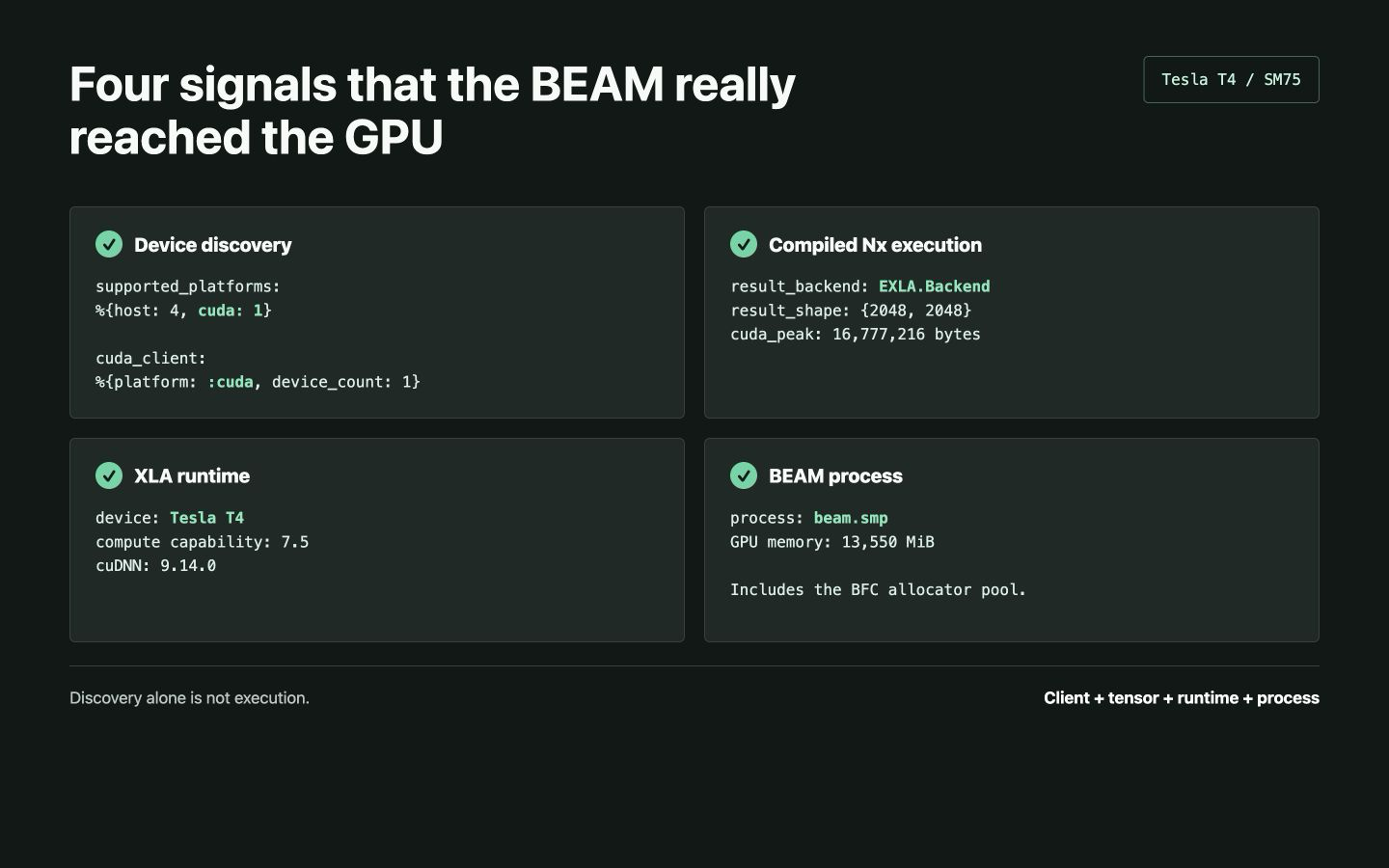
At that point, the XLA log also named the Tesla T4, compute capability 7.5, and cuDNN 9.14.0. That is the proof I wanted before downloading almost three gigabytes of model weights.
Prepare the balanced profile
The Phoenix workbench exposes model preparation separately from inference. I selected
:balanced, chose EXLA, allowed downloads, and prepared the profile once. It downloaded a
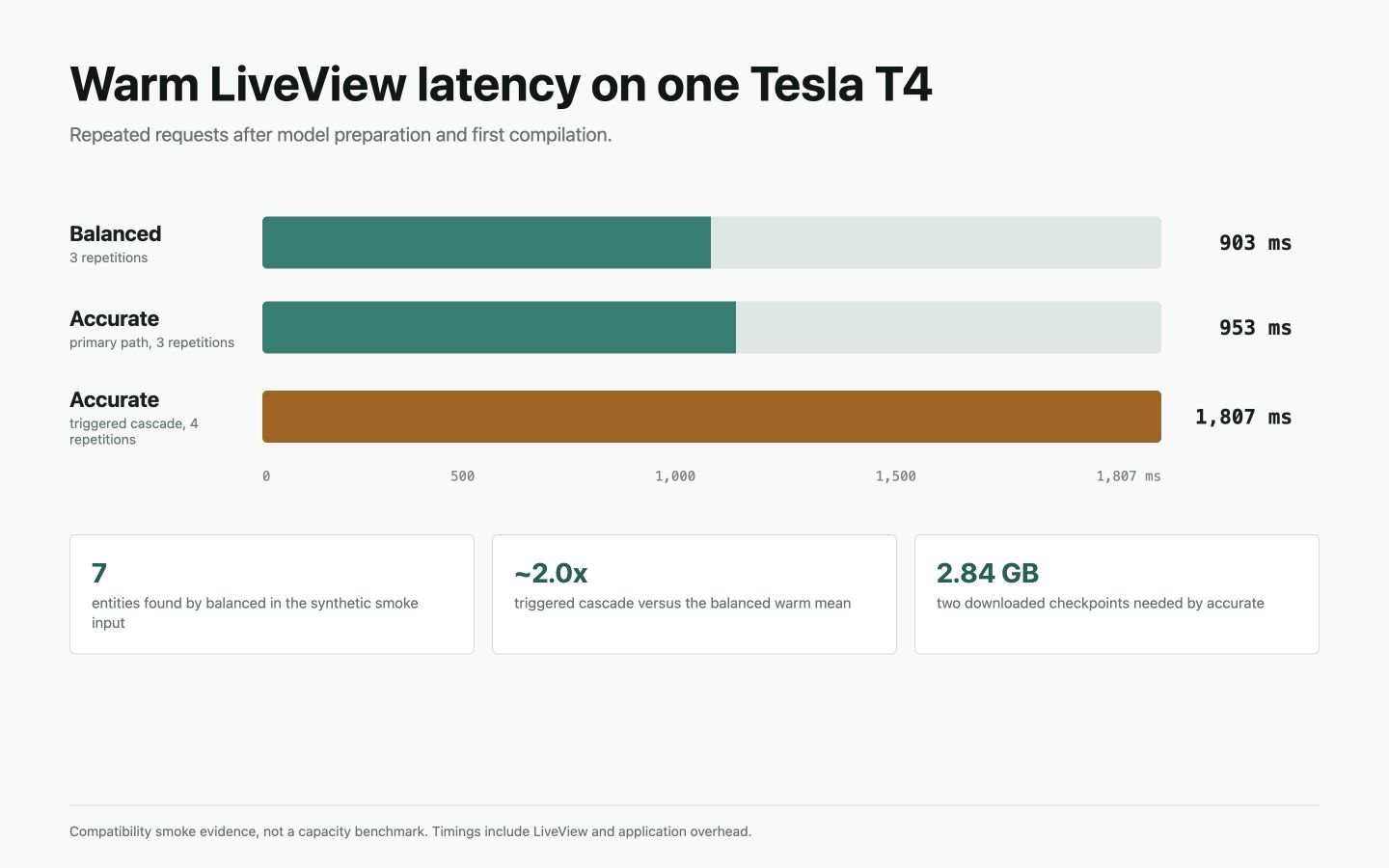
1,417.56 MB TNER checkpoint and retained a reusable serving.
The first request included graph compilation and took 4,639 ms. Three subsequent requests for the same input took 902, 909, and 897 ms.
The test text was synthetic:
Rachel works at Google in Paris. Contact her at info@example.com or
+1 202-555-0188. Visit example.org. Card 4111 1111 1111 1111.
The profile found all seven requested values:
| Entity | Text | Byte range | Score |
|---|---|---|---|
| Person | Rachel | 0-6 | 0.744 |
| Organization | 16-22 | 1.000 | |
| Location | Paris | 26-31 | 0.993 |
| info@example.com | 48-64 | 0.850 | |
| Phone | +1 202-555-0188 | 68-83 | 0.750 |
| Domain | example.org | 91-102 | 0.700 |
| Credit card | 4111 1111 1111 1111 | 109-128 | 1.000 |
The BEAM process then appeared in nvidia-smi as a compute process using 13,550 MiB. That
large value is mainly EXLA's BFC allocator pool reservation. It is evidence that the process
owns CUDA memory, but it is not the model's weight footprint.
I also ran all five anonymization operators once. They all completed: replace, redact, mask, hash, and pseudonymize. Those single runs are behavior checks, not a latency comparison.
Exercise the accurate cascade
The :accurate profile adds a second NER model for conditional location recovery. Preparation
reused the TNER assets and downloaded another 1,417.43 MB checkpoint.
On the original sentence, TNER already accepted Paris, so the secondary model did not need
to run. Warm requests were 890, 1,062, and 908 ms.
To prove the cascade itself, I used a synthetic multiline record where the primary path had no accepted location:
Paula Bjelajac
Demystdata
11 Eriksbo Västergärde 98
 Suite 568
 ANGERED
 Mali
089 72 63 41 office
166-684-7899 fax
(978)645-9740x11144 mobile
The result included Mali as LOCATION at bytes 75-79 with an unrounded score of about
0.9996. That is the expected fingerprint of the Jean-Baptiste secondary location path.
The first triggered cascade request took 3,782 ms. Four final warm repetitions took 1,793,
1,789, 1,836, and 1,811 ms, or about twice the measured warm :balanced request.
It also missed Demystdata as an organization. That is a model miss, not a CUDA failure. The
stable cascade recovers locations; it does not run a second organization recognizer.
What the run proves
The result closes a real compatibility gap:
- the example application runs on Linux;
- EXLA loads against CUDA 13 with a compatible NVSHMEM runtime;
- compiled Nx work executes on a Tesla T4;
beam.smpowns CUDA memory during inference;- model preparation downloads and retains reusable servings;
:balancedreturns deterministic and model-backed entities;:accurateexercises its conditional secondary location model;- repeated requests reuse the prepared runtime instead of rebuilding models.
The application was served through Lightning's browser port proxy. If you reproduce the UI part, the official Port Viewer guide explains how to expose a Studio port without publishing the development server directly.
What it does not prove
This was one T4, one Studio, and one LiveView session. I did not rerun Obscura's authoritative accuracy datasets on this host. I also did not measure concurrency, throughput, p95 or p99, long-running memory growth, crash recovery, or thermal behavior.
The displayed timings include LiveView and application overhead; they are not isolated model
inference measurements. The nvidia-smi memory value includes the BFC pool. Lightning's machine
availability and account allowances can change, so check its current product terms rather than
treating this article as a promise of free T4 capacity.
In short: this proves that Obscura's public preparation and inference workflow works on Linux with an NVIDIA T4 and EXLA CUDA. It does not turn a smoke test into a production capacity plan.
That distinction is easy to skip when the first successful output finally appears. It is also the difference between evidence and a screenshot.
Reproduce the application path
The complete UI is in Obscura Examples. The library, profile behavior, and model preparation API are documented in Obscura.
For the narrowest useful reproduction:
- Start a Lightning Studio on CPU and install Erlang, Elixir, and the repositories.
- Run the dependency-light checks before switching hardware.
- Change the Studio to an NVIDIA GPU and inspect CUDA with
nvidia-smiandnvcc. - Enable the optional EXLA dependency with the matching
XLA_TARGET. - Resolve loader errors by matching real ABIs; never disguise one ABI as another with a symlink.
- Prove a compiled Nx operation uses
EXLA.Backend. - Prepare one Obscura profile once, then run repeated inference requests.
- Confirm the BEAM process appears in
nvidia-smiwhile the model runs. - Stop the GPU when the validation is complete.
That final step is mundane, but it matters. Cloud GPUs are excellent for compatibility work when you do not own the hardware. They are also very easy to leave running.